


Anova Oven
3.2305.00 Reviews
App Specs
- Version
- 1.2.11
- Updated On
- License
- Free
- Downloads
- 10,000+
- Developer
- Anova Applied Electronics, LLC
- Categories
- Food & Drink
- Platform
- Android
Screenshots
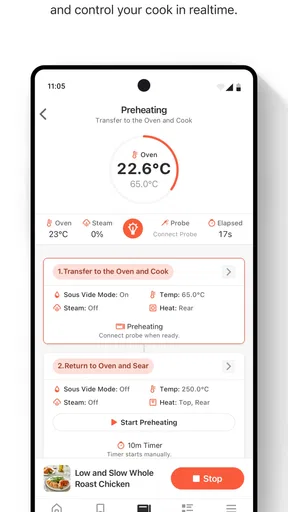
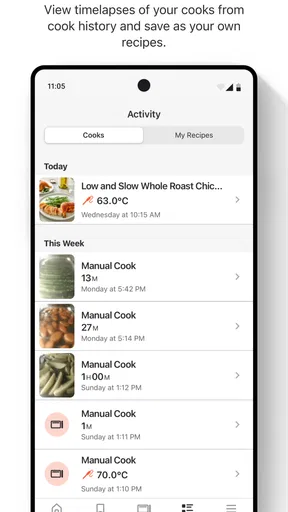
 Analysis by AppCompare
I look at the Anova Oven app less as a general recipe app and more as a remote companion for a particular kind of countertop oven. That distinction matters: its most useful role is helping you plan and manage cooking on the Anova Precision Oven, rather than replacing a standard kitchen timer or offering a broad food-planning system. If you already cook with that oven, it can make the process easier to follow; if you do not, there is little reason to install it on its own.
Who benefits most from a connected oven
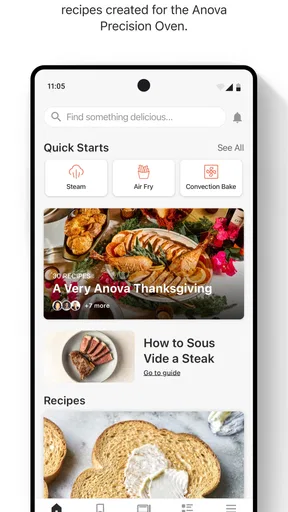
I can see this being useful for someone who likes experimenting with steam, controlled humidity, and sous vide-style cooking but does not want to keep every setting in their head. A guided program can make an unfamiliar method feel less intimidating, while remote control is handy when I am moving between rooms or getting the rest of dinner ready. It is especially appealing if the oven is already part of your routine and you want its app-based controls and recipes in one place.
It is less compelling for a cook who mainly reheats food, uses a conventional oven’s manual controls, or prefers to choose every temperature and timing step without prompts. The app’s value depends on the appliance, and its cooking guidance should be treated as a useful starting point rather than a guarantee that every ingredient, portion, or oven setup will behave exactly the same way.
Readable controls, with a practical caveat
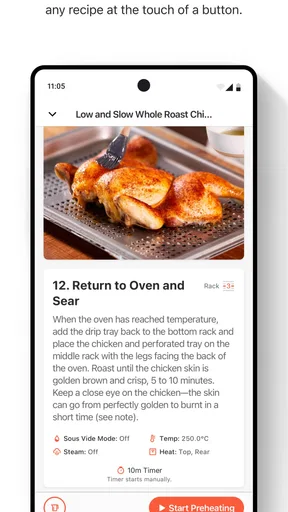
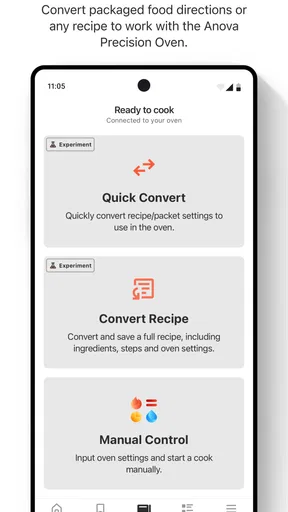
In my experience, the app’s straightforward layout and guided recipes help keep a cooking sequence understandable: instead of translating a recipe into a string of settings from scratch, I can follow the oven-oriented instructions. That can reduce the amount of switching between a recipe page and the appliance controls. It is a meaningful convenience when I am learning a new technique or trying to keep several parts of a meal moving.
There is still a difference between a simple interface and an interface that works equally well for every person. Small text, glare, screen magnification, or difficulty using precise touch controls can make any phone-based cooking workflow tiring. I would check whether the text and controls are comfortable on your own device before relying on the app during a busy meal. The physical oven’s controls also matter: someone who finds phone navigation difficult may prefer using those instead, while a person who has trouble reaching the appliance may appreciate managing tasks from the phone.
Sound, attention, and kitchen context
Cooking already asks me to divide my attention among heat, ingredients, and timing. App guidance can help by keeping instructions together, but it also adds a screen to check. I would read through a recipe before starting, gather ingredients, and confirm the key steps first; that is a calmer approach than trying to interpret a new screen while handling a hot tray. For someone who finds visual instructions difficult, it can help to prepare the steps in a format they can comfortably read before cooking.
Likewise, I would not make an important cooking decision depend on noticing a phone sound or vibration. A noisy kitchen, a phone left in another room, or a muted device can all make alerts easy to miss. The app works best as one part of a routine, alongside checking the food and the oven itself, not as a substitute for attention to what is cooking.
Worth Reading Before You Choose

Flipboard Shows What News Apps Must Do Beyond the Feed

Switching to Android Auto Means Rethinking Your Driving Routine

Google Calendar Makes a Crowded Week Easier to Manage

Ludo King Makes the Most of the Minutes Between Plans

Baby Panda World Brings Quick Play to Modern Phones, but Its Game Library Feels Busy

ESPN’s Live Game View Makes Following Close Games Easier
First Impressions and Setup
Right out of the box, the Anova Oven looks sleek and modern, with a minimalist design that can fit into any kitchen aesthetic. Setting it up was a breeze. The instructions were clear, and the app integration was smooth. Speaking of the app, it’s available for both Android and iOS, and it’s where the magic truly happens.
The app offers a straightforward interface that connects seamlessly with the oven via Wi-Fi. You just need to follow a few steps, and voilà, you’re connected. One thing I loved is that the app not only controls the oven but also provides a plethora of recipes designed specifically for it. It’s like having a cooking coach right in your pocket.
Cooking Features That Stand Out
This isn’t just an oven; it’s a culinary powerhouse. It combines the functions of a convection oven and a steam oven, giving you the ability to bake, roast, steam, and even sous vide. The precision of temperature control is where this oven shines. You can set it to the exact degree, which is a dream for anyone who’s serious about their cooking.
Another cool feature is the ability to control humidity levels. This is particularly useful for baking, where the right humidity can make all the difference in achieving that perfect crust on your bread. I tried it out with a sourdough recipe, and the results were impressive. The crust was crunchy, and the inside was soft and chewy – just like I’d hoped.
Everyday Use and Functionality
Using the Anova Oven day-to-day couldn’t be easier. The interface on the oven itself is intuitive, but I found myself using the app more often. The ability to preheat the oven remotely is a game-changer. Imagine starting your oven on your way home from work, so it’s ready to go when you walk in the door.
One of the most convenient features is the guided cooking programs. These programs adjust the cooking time and temperature for you, based on what you’re cooking. I tested it with a chicken recipe, and it came out perfectly cooked, moist, and flavorful.
Using it alongside other cooking tools
Compared with a typical food-and-drink app, this one is deliberately narrow. A general recipe app may be better for collecting meals across different appliances, making shopping plans, or browsing a wider range of cuisines. A standalone thermometer or timer can be simpler for someone who only wants to monitor one dish. The Anova companion earns its place when its oven-specific instructions and controls save you from manually translating a cooking method into settings.
One practical way to use it is to treat the recipe as a workflow, not merely a list of ingredients: check the method, prepare the food, then let the oven’s controlled settings handle the cooking stage. For bread, that means thinking about humidity as part of the process rather than just setting a temperature. For a weeknight protein, a guided program can reduce setup decisions, but I would still check the food itself and make sensible adjustments for thickness or quantity.
A realistic weeknight routine
On a busy evening, I would use the app before leaving the kitchen rather than relying on it as a hands-off promise. I could choose a suitable guided recipe, set out the ingredients, and start preheating when it fits the meal plan. While the oven works, I can prepare a side dish or clear the counter. That is where remote control feels useful: it can remove an extra trip to the appliance, but it does not remove food preparation or the need to keep an eye on the result.
For a household with different schedules, the same routine can make handoffs clearer. The person starting dinner can leave the next step visible in the app or communicate the recipe’s stage, rather than asking someone else to guess which oven setting was intended. I would still agree on who is checking the food, especially if several people are sharing kitchen duties.
Access depends on the person and the moment
The app can support different situations in a modest, practical way. Remote operation may help someone who has difficulty reaching the oven, and keeping recipe guidance on a phone can be easier than handling a printed page near a crowded counter. On the other hand, a phone can be awkward for someone who has limited dexterity, low vision, or difficulty switching attention between a screen and cooking. A family member or housemate may be able to help with setup, but the daily workflow should be tested by the person who will actually use it.
Context matters too. If the phone is needed for calls, used for another task, or kept away from the cooking area, the app may be less convenient than the oven’s own controls. A user who cannot rely on Wi-Fi at the time they need to operate the oven should not build a meal plan around remote access. I would set up the connection in advance and know which tasks can be handled directly on the appliance, so a network hiccup does not derail dinner.
What I would check before depending on it
Because the app is tied to a specific oven, I would confirm that the Anova Precision Oven is the appliance you own or intend to use before making it part of your routine. I would also test the phone-to-oven connection at home before planning a meal around remote preheating. These simple checks answer the most important practical questions: whether the app is relevant to your setup and whether the controls work reliably in the place you cook.
Another useful habit is to read a guided recipe all the way through before beginning. That lets you spot steps that need advance preparation and decide whether the method fits the time you have. It also makes the app less demanding during cooking, since you are not discovering the sequence one screen at a time while handling ingredients.
Where it can frustrate
The app’s usefulness is inseparable from the oven, so it is not a flexible solution for people who cook on different appliances or want one hub for all their recipes. The connected approach also introduces a dependency that a basic oven and paper recipe do not have: the phone, the app, and the Wi-Fi connection become part of the workflow. If you prefer a cooking routine with no device setup, that extra layer may feel like friction rather than help.
There is also a learning curve to techniques such as steam and controlled humidity. Guidance can make them more approachable, but it cannot replace judgment about ingredient size, personal taste, or when food is ready. I would use the program as a guide and remain attentive, particularly when adapting a recipe or cooking a portion that differs from the one the instructions seem to assume.
What the app costs and who should skip it
The app is free to download, with optional in-app purchases listed from ninety-nine cents to nine dollars and ninety-nine cents per item. Its content rating is Everyone. Anova Applied Electronics, Inc. develops it, and it has a 3.2 average from around 880 ratings, with more than 10,000 installs. It was released on August 14, 2020; version 1.2.8 is the current version, and it requires operating system 8.1 or later.
Those figures make me cautious rather than dismissive: the rating suggests experiences are mixed, so I would not assume every user finds setup or day-to-day use effortless. The app is a sensible candidate if you own the matching oven and value connected control and guided cooking. I would skip it if you want an independent recipe library, do not use the Anova oven, or need a cooking tool that works without a phone-based connection.
Cooking Features That Stand Out
This isn’t just an oven; it’s a culinary powerhouse. It combines the functions of a convection oven and a steam oven, giving you the ability to bake, roast, steam, and even sous vide. The precision of temperature control is where this oven shines. You can set it to the exact degree, which is a dream for anyone who’s serious about their cooking.
Another cool feature is the ability to control humidity levels. This is particularly useful for baking, where the right humidity can make all the difference in achieving that perfect crust on your bread. I tried it out with a sourdough recipe, and the results were impressive. The crust was crunchy, and the inside was soft and chewy – just like I’d hoped.
Everyday Use and Functionality
Using the Anova Oven day-to-day couldn’t be easier. The interface on the oven itself is intuitive, but I found myself using the app more often. The ability to preheat the oven remotely is a game-changer. Imagine starting your oven on your way home from work, so it’s ready to go when you walk in the door.
One of the most convenient features is the guided cooking programs. These programs adjust the cooking time and temperature for you, based on what you’re cooking. I tested it with a chicken recipe, and it came out perfectly cooked, moist, and flavorful.
What’s the Catch?
While the oven has a lot going for it, there are a few things to keep in mind. First, the price point is higher than your average oven. However, considering the features and the convenience it offers, it could be a worthwhile investment for those who love cooking.
Another consideration is the size. It’s not massive but make sure you have enough counter space, as it’s slightly larger than a standard toaster oven. It’s perfect for a small family or a couple, but if you’re cooking for a large group, you might need to do it in batches.
Final Thoughts
Overall, the Anova Oven is an impressive piece of technology that brings professional-level cooking tools into the home kitchen. It’s perfect for those who love experimenting and want to take their cooking skills to the next level. The app integration makes it incredibly user-friendly, and the precision it offers can genuinely elevate your cooking.
If you’re passionate about food and technology, this oven is definitely worth a look. It’s not just about cooking; it’s about enjoying the process and the results. So, if you’re ready to revolutionize your kitchen, the Anova Oven might just be the gadget for you.
Pros
- User-friendly interface makes cooking simple.
- Precise temperature control for perfect results.
- Wide range of cooking modes available.
- Wi-Fi connectivity for remote monitoring.
- Consistent performance every time.
Cons
- Initial setup can be a bit complex.
- App updates occasionally cause glitches.
- Limited recipe database compared to competitors.
- Requires stable internet for optimal use.
- Notifications can be overly frequent.
FAQs for Anova Oven
What is the Anova Oven app used for?
The Anova Oven app is designed to enhance your cooking experience by connecting to the Anova Precision Oven. It offers features such as remote control, recipe guides, and precise temperature monitoring, allowing you to cook with precision and consistency. It’s an essential tool for culinary enthusiasts.
Is the Anova Oven app compatible with all devices?
The Anova Oven app is compatible with most modern Android and iOS devices. However, it’s recommended to check the app’s requirements on the Google Play Store or Apple App Store to ensure your device supports all features, including Bluetooth or Wi-Fi connectivity.
Do I need an internet connection to use the Anova Oven app?
While some features of the Anova Oven app can be used offline, an internet connection is required for downloading recipes, updating the app, and accessing certain online resources. For full functionality, including remote control and notifications, a stable internet connection is recommended.
How user-friendly is the Anova Oven app for beginners?
The Anova Oven app is designed with an intuitive interface that is user-friendly for both beginners and experienced cooks. It provides step-by-step guides, video tutorials, and easy navigation. This makes it accessible for users who are new to precision cooking and oven operations.
Are there any subscription fees for using the Anova Oven app?
The Anova Oven app itself is free to download and use. However, some premium features or additional content might require in-app purchases or a subscription. It’s advisable to review the app’s details in the store for any potential costs associated with its advanced features.


